- July 22, 2026
- Deva Selvan
- 3:42 pm
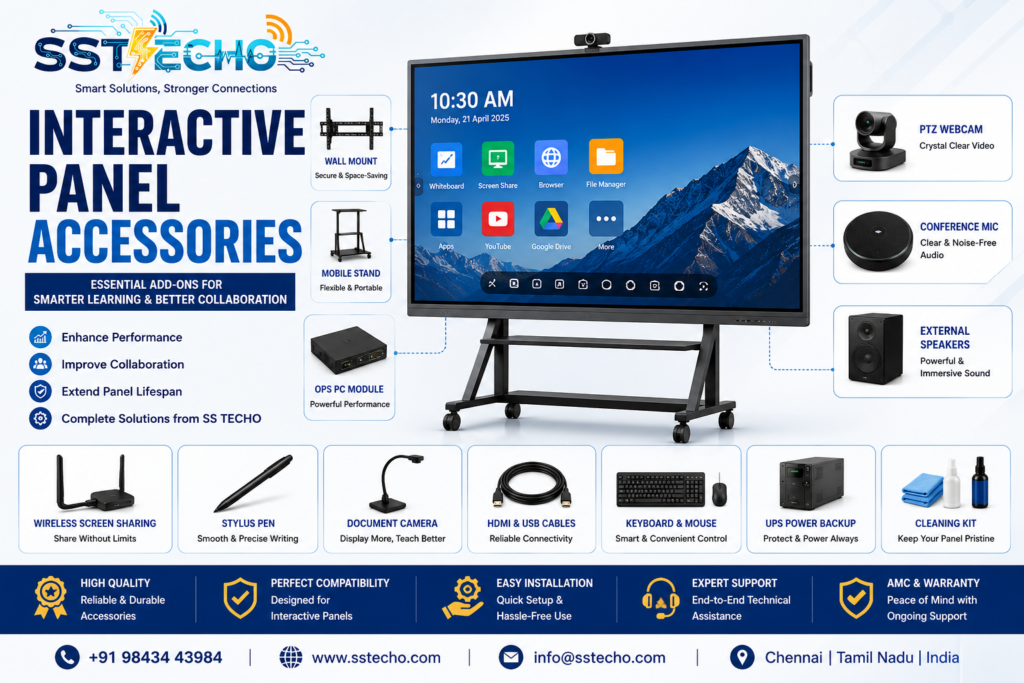
Interactive Panels have transformed classrooms, conference rooms, training centers, and collaborative workspaces by replacing traditional whiteboards and projectors. However, to unlock their full potential, choosing the right Interactive Panel accessories is just as important as selecting the panel itself.
If you’re planning to invest in a new display, start with our Interactive Panel Buying Guide to understand the key factors before purchasing.
Accessories improve mobility, enhance collaboration, simplify presentations, enable video conferencing, and extend the life of your investment.
At SS TECHO, we provide complete Interactive Panels in Chennai along with professional accessories, installation, and support services.
Why Are Interactive Panel Accessories Important?
A modern Interactive Panel is much more than a touchscreen display. When combined with the right accessories, it becomes a complete collaboration solution. Understanding the features of Interactive Panels helps you choose accessories that complement your display.
Benefits include:
- Improved classroom engagement
- Better meeting room collaboration
- Professional video conferencing
- Easy mobility
- Cleaner cable management
- Enhanced writing experience
- Faster wireless presentations
- Improved audio quality
- Extended equipment lifespan
1. Wall Mount Brackets
Wall mounting is the most popular installation option for Interactive Panels.
Professional installation ensures the panel is mounted safely and at the correct viewing height. Learn more about our Interactive Panel Installation Services for hassle-free setup.
Advantages
- Saves floor space
- Professional appearance
- Secure installation
- Ideal for classrooms
- Suitable for meeting rooms
- Better cable management
Professional installation ensures the panel is mounted safely and at the correct viewing height.
2. Mobile Floor Stand
A mobile stand allows the Interactive Panel to be moved between rooms.
If you’re still deciding on the ideal screen size, check our Interactive Panel Sizes Guide before selecting a stand.
Perfect for:
- Schools
- Colleges
- Training centres
- Corporate offices
- Conference rooms
- Event halls
Benefits
- Easy mobility
- Lockable wheels
- Adjustable height
- No wall drilling
- Flexible room usage
3. OPS PC Module
Many Interactive Panels support an OPS PC, transforming the display into a powerful Windows-based collaboration device. This is one of the most valuable Interactive Panel Features for businesses and educational institutions.
Advantages
- Windows environment
- Microsoft Office compatibility
- Fast processing
- No external CPU required
- Better cable management
Ideal for business presentations, teaching, and interactive applications.
4. Wireless Screen Sharing Device
Wireless presentation systems eliminate HDMI cables and improve collaboration. These accessories are especially useful in Interactive Meeting Rooms and conference spaces.
Features include:
- One-click presentation
- Screen mirroring
- BYOD (Bring Your Own Device)
- Multi-user collaboration
- Android compatibility
- Windows compatibility
- macOS compatibility
- iOS support
Ideal for modern meeting rooms.
5. Digital Stylus Pen
Interactive stylus pens provide a natural writing experience for teachers and trainers. They are widely used in Smart Classrooms and Schools for interactive teaching.
Benefits:
- Accurate handwriting
- Precision drawing
- Annotation
- Whiteboard applications
- Signature capture
- Graphic design support
Useful for teachers, trainers, and designers.
6. PTZ Webcam
Professional video conferencing requires a high-quality webcam. PTZ cameras are ideal for Interactive Panel Video Conferencing solutions.
Features:
- Full HD or 4K
- Auto tracking
- Wide-angle lens
- Zoom capability
- Remote control
- AI speaker tracking
Best suited for:
- Boardrooms
- Conference rooms
- Online classrooms
- Hybrid learning
7. Conference Microphone
A conference microphone ensures crystal-clear communication during hybrid meetings. It works perfectly with Interactive Conference Rooms.
Microphone advantages:
- Noise reduction
- Echo cancellation
- Long pickup range
- USB connectivity
- Wireless options
- Crystal-clear voice quality
8. External Speakers
External speakers provide enhanced sound quality for larger spaces and are commonly used in Interactive Training Rooms.
Ideal for:
- Auditoriums
- Large classrooms
- Training centres
- Seminar halls
Benefits:
- Better sound quality
- Higher volume
- Even sound distribution
9. Document Camera
Document cameras are excellent for education and demonstrations. They pair perfectly with Smart Classroom Solutions.
Applications:
- Science demonstrations
- Mathematics
- Engineering
- Medical education
- Product demonstrations
10. HDMI & USB Extension Cables
Reliable connectivity ensures uninterrupted presentations and meetings. During installation, quality accessories and proper cable management are essential. Learn more about professional installation services.
Common accessories include:
- HDMI cables
- USB cables
- USB-C adapters
- DisplayPort adapters
- Network cables
- Power extension cables
Using certified cables ensures stable performance and better image quality.
11. Wireless Keyboard & Mouse
These accessories improve productivity when using Windows OPS PCs and complement the advanced Interactive Panel Features available in modern displays.
Benefits:
- Comfortable navigation
- Easy typing
- Faster operation
- Better classroom management
12. Cable Management Kit
Proper cable management improves safety, keeps installations neat, and simplifies future maintenance. Follow our for long-term performance.
Advantages:
- Reduced clutter
- Enhanced safety
- Easy maintenance
- Professional installation
13. UPS (Uninterruptible Power Supply)
A UPS protects your Interactive Panel from voltage fluctuations and unexpected power failures. It is also recommended as part of regular preventive maintenance
Benefits:
- Backup power
- Voltage protection
- Safe shutdown
- Equipment protection
Especially important for educational institutions and corporate offices.
14. Cleaning Kit
Using the correct cleaning kit helps maintain display clarity and touch sensitivity. Read our Interactive Panel Maintenance Guide for safe cleaning practices.
Recommended items:
- Microfiber cloth
- Alcohol-free screen cleaner
- Dust remover
- Anti-static wipes
Avoid abrasive materials and harsh chemicals.
15. Interactive Panel Trolley
Heavy-duty trolleys are perfect for organizations that require mobility between classrooms and meeting spaces. They are especially useful for Corporate Offices and educational institutions.
Features:
- Heavy load capacity
- Lockable wheels
- Adjustable shelves
- Camera mounting support
- Accessory storage
Recommended Accessories by Industry
Schools
- Mobile stand
- Stylus pen
- Document camera
- Wireless screen sharing
- UPS
Colleges
- OPS PC
- PTZ Camera
- Speakers
- Microphone
- Mobile stand
Corporate Offices
- Conference camera
- Ceiling microphone
- Wireless presentation system
- OPS PC
- Wall mount
Training Centres
- Wireless screen sharing
- Webcam
- Speakers
- Mobile stand
- Stylus pen
How SS TECHO Helps
SS TECHO provides complete Interactive Panel solutions, including:
- Interactive Panels
- Professional installation
- Wall mounting
- Mobile stands
- OPS PCs
- Wireless presentation devices
- PTZ cameras
- Conference microphones
- Speakers
- AMC & maintenance
- Technical support
- On-site service across Chennai and Tamil Nadu
Our team helps you choose the right accessories based on your room size, usage, and budget.
Why Choose SS TECHO?
- Experienced installation team
- Genuine accessories
- Competitive pricing
- Customized solutions
- Quick technical support
- Warranty assistance
- Annual Maintenance Contracts (AMC)
- End-to-end project execution
Frequently Asked Questions ?
1. Which accessories are essential for an Interactive Panel?
Wall mounts or mobile stands, OPS PCs, stylus pens, webcams, microphones, and wireless screen-sharing devices are among the most useful accessories.
2. Can I use a normal webcam with an Interactive Panel?
Yes. Most USB webcams are compatible, but PTZ webcams are recommended for professional meetings and hybrid classrooms.
3. Do I need an OPS PC?
If you need a full Windows environment for presentations, software applications, or multitasking, an OPS PC is highly recommended.
4. Is a mobile stand better than a wall mount?
A mobile stand offers flexibility and portability, while a wall mount provides a permanent, space-saving installation.
5. Does SS TECHO provide Interactive Panel accessories?
Yes. SS TECHO supplies, installs, and supports a wide range of Interactive Panel accessories, including mobile stands, wall mounts, OPS PCs, webcams, microphones, speakers, wireless presentation systems, and maintenance services.
Contact SS TECHO
Keep Your Interactive Panel Performing at Its Best
Regular maintenance is the key to maximizing the performance, reliability, and lifespan of your Interactive Panel. Simple daily cleaning, periodic software updates, proper power management, and professional servicing can prevent costly repairs and ensure uninterrupted collaboration.
Whether your Interactive Panel is used in a classroom, boardroom, training center, or conference room, SS TECHO provides expert installation, maintenance, technical support, and AMC services to keep your investment operating at its best.
Contact SS TECHO today for professional Interactive Panel maintenance services and long-term support in Chennai.