- July 21, 2026
- Deva Selvan
- 2:54 pm
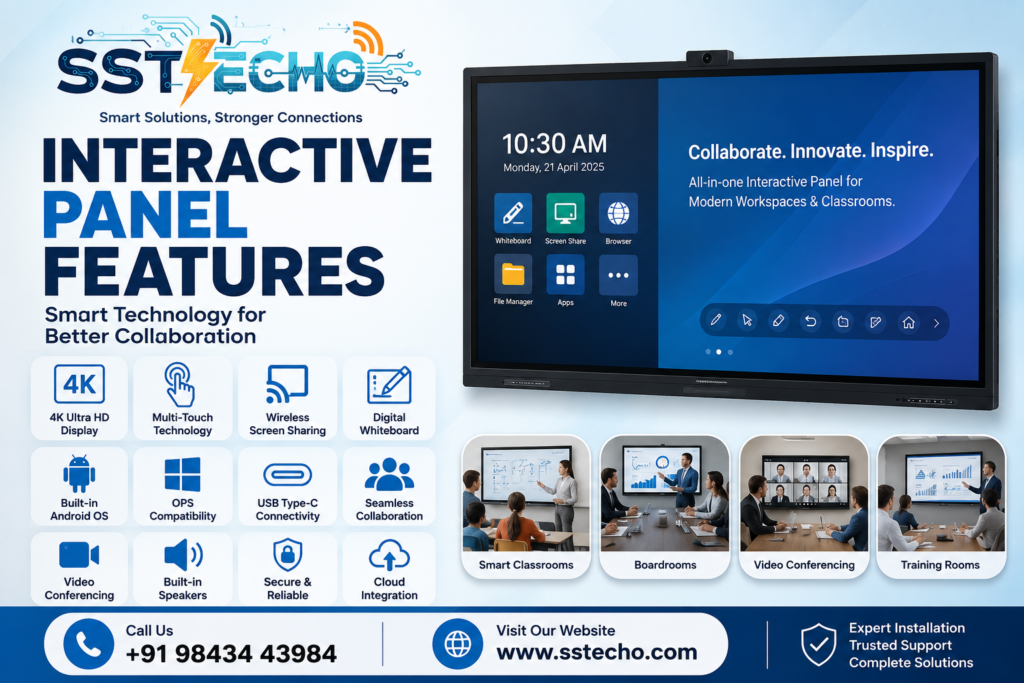
Interactive Panels have transformed the way businesses, schools, colleges, and training institutions collaborate, teach, and communicate. Unlike traditional whiteboards and projectors, modern Interactive Panels combine a 4K display, touch-enabled technology, digital whiteboarding, wireless presentation, and video conferencing into one powerful device.
Whether you’re setting up a smart classroom, upgrading a corporate boardroom, or modernizing a conference room, understanding the key Interactive Panel Features helps you choose the right solution for your organization.
At SS TECHO, we provide complete Interactive Panel solutions across Chennai, including consultation, installation, training, warranty, and AMC support. Explore our Interactive Panels in Chennai to find the right solution for your business or institution.
What is an Interactive Panel?
An Interactive Panel is a large-format touchscreen display designed to make presentations, teaching, meetings, and collaboration more engaging and efficient. It replaces traditional projectors, whiteboards, and flip charts by integrating multiple technologies into a single device.
Interactive Panels are widely used in:
- Schools
- Colleges
- Universities
- Corporate Offices
- Boardrooms
- Conference Rooms
- Training Centres
- Government Offices
- Healthcare Institutions
They support touch interaction, digital annotation, multimedia presentations, wireless screen sharing, and online collaboration.
1. 4K Ultra HD Display
One of the most important Interactive Panel features is its 4K Ultra HD display, offering exceptional clarity and vibrant visuals.
Benefits:
- Crystal-clear text and images
- Sharp presentations
- Wide viewing angles
- Anti-glare display
- Comfortable viewing during long sessions
A high-resolution display improves learning in classrooms and ensures professional presentations during business meetings.
2. Multi-Touch Technology
Modern Interactive Panels support multiple touch points, allowing several users to interact with the screen simultaneously.
Advantages:
- Multi-user collaboration
- Finger and stylus support
- Smooth handwriting
- Simultaneous annotations
- Interactive learning
This feature is especially valuable for collaborative environments such as Training Rooms, classrooms, and brainstorming sessions.
3. Digital Whiteboard
Interactive Panels eliminate the need for traditional whiteboards.
Users can:
- Write naturally
- Draw diagrams
- Highlight presentations
- Create flowcharts
- Save meeting notes
- Export files as PDF or image
Digital whiteboarding enhances collaboration during meetings and training sessions.
Organizations looking for smarter executive meeting spaces can also explore our Interactive Panels for Boardrooms.
4. Wireless Screen Sharing
Interactive Panels allow users to wirelessly share screens from:
- Windows laptops
- MacBooks
- Android smartphones
- iPhones
- Tablets
Benefits
- Faster presentations
- Reduced cable clutter
- Multiple presenters
- Seamless collaboration
Wireless sharing saves valuable meeting time and improves productivity.
5. Built-in Android Operating System
Most Interactive Panels include an integrated Android operating system, allowing users to work without connecting an external computer.
Built-in applications often include:
- Whiteboard
- Web Browser
- File Manager
- Screen Sharing
- Office Document Viewer
- Annotation Tools
This makes the panel ready to use immediately after powering on.
6. Windows OPS Compatibility
Many organizations require advanced software that runs on Windows.
Interactive Panels support OPS (Open Pluggable Specification) computers, enabling users to install a Windows PC directly into the display.
Benefits :
- Microsoft Office
- AutoCAD
- ERP Software
- CRM Applications
- Advanced Presentation Tools
OPS provides the flexibility of a full Windows environment while maintaining a clean installation.
7. USB Type-C Connectivity
USB Type-C simplifies connectivity by combining multiple functions into a single cable.
A single USB Type-C connection can provide:
- Video output
- Touch control
- Data transfer
- Laptop charging
This creates a cleaner and more efficient workspace.
8. Multiple Connectivity Options
Interactive Panels support a wide range of input and output ports.
Common options include:
- HDMI
- USB
- USB Type-C
- LAN
- Wi-Fi
- Bluetooth
- DisplayPort
- Audio Out
These options ensure compatibility with existing office and classroom equipment.
9. AI-Powered Smart Features
Many modern Interactive Panels now include AI-based enhancements.
Examples include:
- AI Camera Integration
- Auto Framing
- Face Tracking
- Voice Tracking
- Gesture Recognition
- Smart Recording
These features improve hybrid meetings and online learning experiences.
10. Video Conferencing Compatibility
Interactive Panels integrate seamlessly with popular collaboration platforms.
Supported platforms include:
- Microsoft Teams
- Zoom
- Google Meet
- Cisco Webex
Combined with compatible cameras and microphones, they become a complete video conferencing solution.
Learn more about our Interactive Panels for Video Conferencing.
11. Interactive Collaboration Tools
Interactive Panels make teamwork easier through built-in collaboration features.
Users can:
- Split the screen
- Compare documents
- Annotate presentations
- Brainstorm ideas
- Share files instantly
- Collaborate in real time
These capabilities improve engagement during meetings and training programs.
12. Built-in Speakers
Many Interactive Panels include high-quality built-in speakers.
Advantages include:
- Clear audio
- Reduced need for external speakers
- Better online meetings
- Enhanced classroom teaching
This improves the overall user experience without additional hardware.
13. Security Features
Business and educational environments require secure access to sensitive information.
Interactive Panels often provide:
- User Login
- PIN Protection
- USB Lock
- Password Security
- Data Encryption
- Secure File Access
These features help protect confidential data.
14. Cloud Integration
Interactive Panels support integration with cloud storage services.
Examples include:
- Google Drive
- Microsoft OneDrive
- Dropbox
Benefits include:
- Access files anywhere
- Share documents instantly
- Cloud backup
- Real-time collaboration
Cloud integration simplifies teamwork across multiple locations.
15. Energy-Efficient Design
Modern Interactive Panels are designed to reduce power consumption while delivering high performance.
Benefits
- Lower electricity usage
- Long display lifespan
- Reduced maintenance
- Environmentally friendly operation
Energy-efficient technology helps reduce operating costs over time.
Why These Features Matter
Different industries benefit from Interactive Panels in different ways.
Schools :
- Interactive teaching
- Better student engagement
- Multimedia lessons
- Collaborative learning
For educational institutions, see our guide on Best Interactive Panels for Schools.
Corporate Offices :
- Professional presentations
- Brainstorming sessions
- Hybrid meetings
- Team collaboration
Explore our Interactive Panels for Corporate Offices.
Conference Rooms :
- Wireless presentations
- Client meetings
- Strategic discussions
- Video conferencing
Discover our Interactive Panels for Conference Rooms .
Training Centres :
- Interactive workshops
- Skill development
- Employee onboarding
- Digital learning
Learn more about Interactive Panels for Training Rooms.
How to Choose the Right Interactive Panel
Before purchasing an Interactive Panel, consider:
- Screen size (65″, 75″, or 86″)
- Display resolution
- Number of touch points
- Android version
- Windows OPS compatibility
- Wireless sharing capability
- Video conferencing support
- Warranty
- Service availability
- Installation support
For a detailed selection process, read our Interactive Panel Buying Guide.
Why Choose SS TECHO?
SS TECHO delivers end-to-end Interactive Panel solutions for businesses and educational institutions across Chennai.
Our services include:
- Expert Consultation
- Site Assessment
- Product Recommendation
- Professional Installation
- Device Configuration
- User Training
- Warranty Support
- Annual Maintenance Contract (AMC)
- Dedicated Technical Assistance
We work closely with clients to ensure every Interactive Panel is installed, configured, and optimized for long-term performance.
Frequently Asked Questions ?
1. What are the most important Interactive Panel features?
Key features include a 4K display, multi-touch support, digital whiteboard, wireless screen sharing, Android OS, OPS compatibility, video conferencing integration, and cloud connectivity.
2. Does an Interactive Panel require a computer?
No. Most Interactive Panels include a built-in Android operating system. A Windows OPS module can be added if advanced Windows applications are required.
3. Can Interactive Panels be used for online meetings?
Yes. They support Microsoft Teams, Zoom, Google Meet, Cisco Webex, and other popular video conferencing platforms when paired with compatible cameras and microphones.
4. Which screen size should I choose?
The ideal size depends on your room dimensions and audience. Smaller meeting rooms often use 65-inch panels, while larger conference rooms and training halls may benefit from 75-inch or 86-inch models.
5. Are Interactive Panels suitable for schools and colleges?
Yes. They enhance classroom engagement through touch interaction, multimedia content, and collaborative learning, making them an excellent choice for educational institutions.
Contact SS TECHO
Upgrade to Smarter Collaboration with SS TECHO
Interactive Panels are changing how organizations communicate, teach, and collaborate. From interactive classrooms and training centres to boardrooms and conference rooms, the right features can significantly improve productivity and engagement.
If you’re planning to implement Interactive Panels in your organization, SS TECHO offers complete solutions including consultation, installation, user training, warranty, and AMC support.
Contact our team today to find the Interactive Panel that best fits your business or educational requirements.