
- July 9, 2026
- Deva Selvan
- 5:16 pm
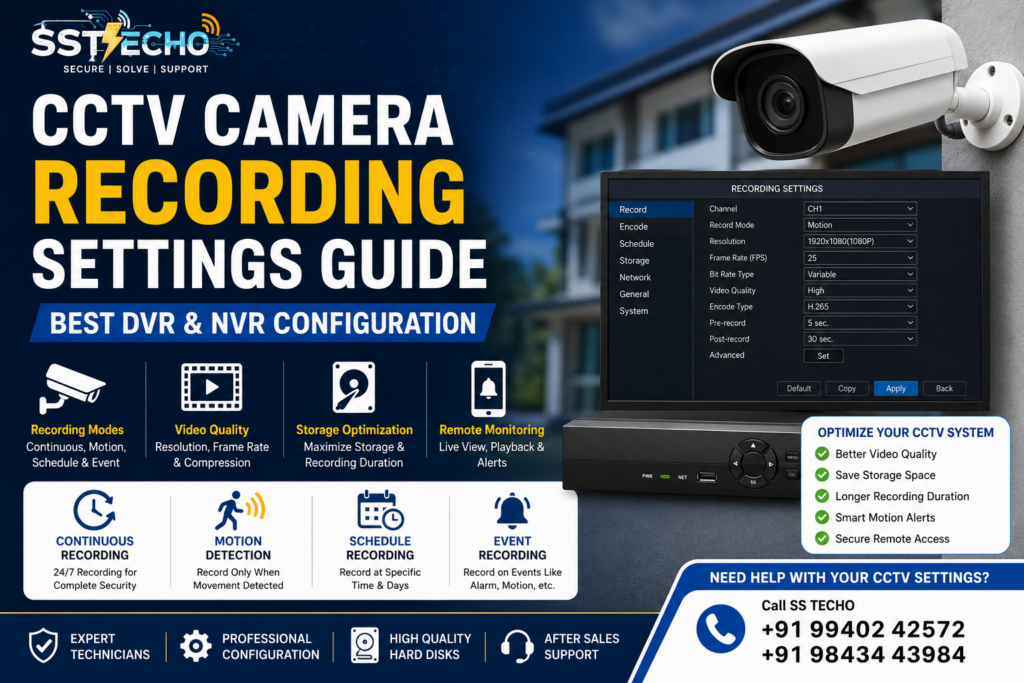
A CCTV surveillance system is only as effective as its recording settings. Even the best CCTV cameras can miss important footage if the DVR or NVR is not configured correctly. Choosing the right recording mode, resolution, frame rate, and storage settings ensures your surveillance system captures clear footage while maximizing storage capacity.
At SS TECHO, we configure every CCTV system professionally to provide reliable recording, smooth playback, and secure remote monitoring. Whether you have a home, office, shop, warehouse, school, or commercial property, understanding the correct recording settings helps improve your overall security.
If you’re looking for professional CCTV Installation Chennai our experienced technicians provide customized security solutions with expert installation and after-sales support.
Why CCTV Recording Settings Matter
Many people install CCTV cameras but continue using the default recording settings. This can result in:
- Poor video quality
- Reduced recording duration
- Missed motion events
- Wasted hard disk space
- Slow playback
- Increased maintenance issues
Proper recording settings help improve security while making the best use of your DVR or NVR storage
Before configuring your DVR or NVR, it’s important to understand the complete CCTV Installation Process.
Types of CCTV Recording Modes
Modern CCTV systems provide multiple recording options depending on your security requirements. Choosing the right recording mode depends on your camera type. Learn the differences in our IP Camera vs Analog Camera guide.
Continuous Recording
Continuous recording captures video 24 hours a day without interruption.
Advantages
- Every event is recorded
- Suitable for banks, hospitals, warehouses, and factories
- Easier investigation after incidents
Disadvantages
- Consumes more hard disk space
- Shorter recording retention period
Continuous recording is recommended for locations where uninterrupted surveillance is essential.
Motion Detection Recording
Motion detection recording starts only when movement is detected.
Advantages
- Saves storage space
- Extends recording duration
- Easy to locate important events
- Reduces unnecessary footage
This mode is ideal for homes, apartments, offices, and retail shops.
Scheduled Recording
Scheduled recording allows cameras to record only during selected time periods.
Example:
- Office Hours
- Night Shift
- Weekends
- Holidays
This helps optimize storage while monitoring important business hours
Event-Based Recording
Some advanced CCTV systems support recording based on specific events such as:
- Motion Detection
- Line Crossing
- Intrusion Detection
- Human Detection
- Vehicle Detection
These intelligent features improve surveillance efficiency while reducing false alerts.
Choosing the Right Recording Resolution
Recording resolution determines video clarity.
Common resolutions include:
| Resolution | Suitable For |
|---|---|
| 2MP | Homes & Small Shops |
| 5MP | Offices & Commercial Buildings |
| 8MP (4K) | Warehouses, Factories & Large Properties |
Higher resolution provides better image quality but requires more storage space.
Best Frame Rate (FPS) Settings
Frame Rate (Frames Per Second) controls how smoothly recorded video appears.
Recommended settings:
- 15 FPS – Homes
- 20 FPS – Offices
- 25–30 FPS – Banks, Cash Counters & High Security Areas
Higher FPS improves motion clarity but increases storage usage.
Video Compression (H.264 vs H.265)
Compression technology reduces file size while maintaining video quality.
H.264
- Widely Supported
- Good Video Quality
- Higher Storage Usage
H.265
- Better Compression
- Lower Storage Usage
- Longer Recording Duration
- Better Video Quality
Whenever supported, H.265 is recommended because it significantly reduces storage requirements.
Storage Optimization Tips
Recording settings directly affect how long CCTV footage can be stored.
To maximize storage:
- Enable Motion Recording where appropriate
- Use H.265 Compression
- Remove unnecessary cameras
- Delete unwanted recordings regularly
- Install larger surveillance hard disks
- Configure overwrite settings properly
These adjustments help extend recording duration without compromising security.
Motion Detection Settings
Motion detection is one of the most useful CCTV features.
Proper configuration includes:
- Motion Sensitivity
- Detection Area
- Human Detection
- Vehicle Detection
- Alert Notifications
Avoid setting sensitivity too high, as this may trigger unnecessary recordings caused by pets, trees, or moving shadows.
Remote Viewing & Mobile Notifications
Modern CCTV systems allow users to monitor their property remotely.
Features include:
- Live View
- Playback
- Motion Alerts
- Snapshot Notifications
- Multi-Camera Viewing
Ensure mobile notifications are enabled only for important events to avoid excessive alerts.
We also provide Wireless CCTV Camera Installation in Chennai with secure remote monitoring and mobile app setup.
Common CCTV Recording Mistakes
Many users experience recording issues because of incorrect configuration.
Common mistakes include:
- Using factory default settings
- Choosing very high resolution for every camera
- Ignoring storage capacity
- Not enabling overwrite mode
- Incorrect date & time settings
- Poor motion detection configuration
- Forgetting to test playback
- Weak administrator passwords
Professional setup helps prevent these issues.
Best Practices for CCTV Recording
Follow these recommendations:
- Choose the appropriate recording mode
- Use H.265 compression whenever possible
- Configure motion detection correctly
- Test recording every month
- Check hard disk health regularly
- Update DVR/NVR firmware
- Enable secure remote access
- Change default passwords immediately
These practices improve system performance and long-term reliability.
Why Choose SS TECHO?
SS TECHO provides professional CCTV installation, DVR/NVR configuration, repair, and maintenance services across Chennai.
Our services include:
- Professional CCTV Installation
- DVR & NVR Configuration
- Motion Detection Setup
- Mobile App Configuration
- Hard Disk Installation
- CCTV Repair Services
- CCTV AMC Services
- Remote Monitoring Setup
- Free Site Inspection
- After-Sales Support
We customize every CCTV system to match your security requirements and recording needs.
Frequently Asked Questions ?
Which recording mode is best for CCTV?
Motion detection recording is suitable for most homes and offices, while continuous recording is recommended for high-security environments.
Which is better, H.264 or H.265?
H.265 provides better compression and longer recording duration while maintaining excellent video quality.
How much storage do I need?
Storage depends on the number of cameras, recording resolution, frame rate, and recording mode. Larger systems generally require higher-capacity surveillance hard disks.
Can I receive motion alerts on my phone?
Yes. Most modern DVR and NVR systems support mobile notifications when motion detection is enabled.
Contact SS TECHO
Need Warehouse CCTV Installation in Chennai?
A professionally installed CCTV system provides long-term security, reliable recording, and peace of mind. Following a structured installation checklist helps ensure that cameras are positioned correctly, recording is configured properly, and remote monitoring works without issues.
Whether you’re securing a home, office, shop, or commercial property, SS TECHO provides expert CCTV installation, repair, maintenance, and AMC services tailored to your requirements.
Contact SS TECHO today for a FREE site inspection and professional CCTV installation in Chennai.