
- July 11, 2026
- Deva Selvan
- 11:11 am
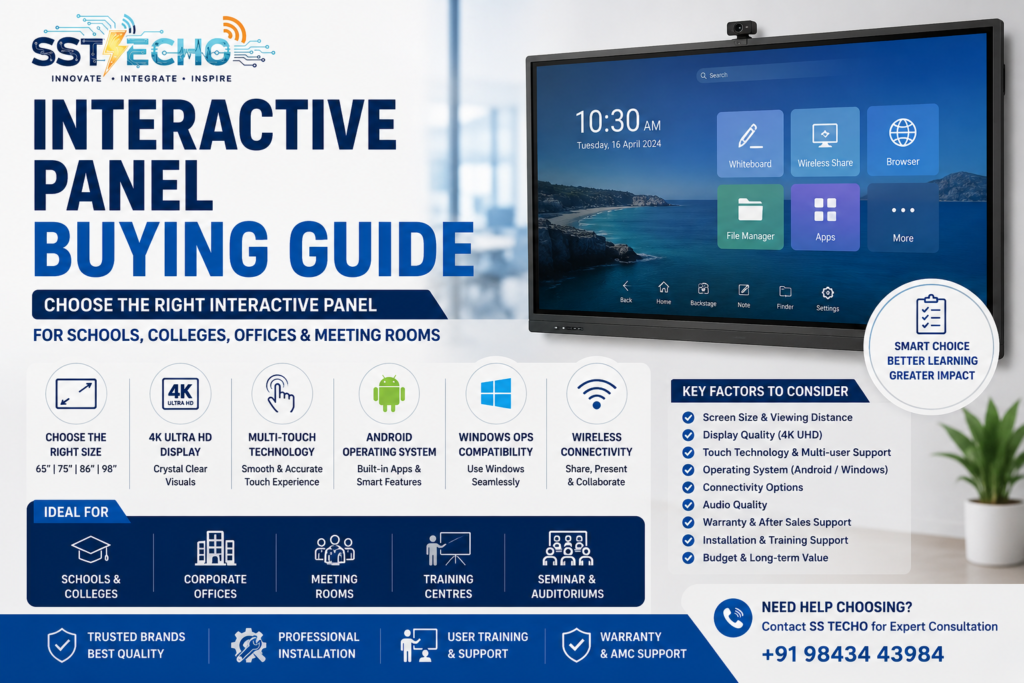
Choosing the right Interactive Panel Installation in Chennai is an important decision for schools, colleges, corporate offices, training centres, and meeting rooms. An Interactive Panel is a long-term investment that improves collaboration, enhances presentations, and creates engaging learning experiences. With many brands, screen sizes, operating systems, and features available in the market, selecting the right model can be confusing.
This Interactive Panel Buying Guide explains everything you need to know before purchasing an Interactive Flat Panel, including display size, touch technology, operating system, connectivity, audio quality, and installation considerations.
At SS TECHO, we help educational institutions and businesses across Chennai choose, install, and maintain Interactive Panels that match their requirements and budget.
If you’re looking for complete solutions, explore our Interactive Panels Chennai service.
Why Invest in an Interactive Panel?
Interactive Panels are replacing traditional projectors and whiteboards because they provide a better visual experience, easier collaboration, and lower maintenance.
Benefits include:
- Crystal-clear 4K display
- Multi-touch interaction
- Digital whiteboard
- Wireless screen sharing
- Built-in Android operating system
- Video conferencing support
- Easy content sharing
- Long product lifespan
- Low maintenance costs
Whether you’re teaching students or presenting to clients, Interactive Panels create a more engaging environment.
Understand Your Requirements Before Buying
Before selecting an Interactive Panel, ask yourself:
- Where will it be installed?
- How many users will view the screen?
- Will it be used for teaching or business meetings?
- Do you need video conferencing?
- Will multiple users write simultaneously?
- Is Windows OPS support required?
- What is your budget?
These questions help narrow down the most suitable model.
Choosing the Right Screen Size
Selecting the correct screen size is one of the most important decisions.
65-inch Interactive Panel
Suitable for:
- Small classrooms
- Small meeting rooms
- Coaching centres
- Offices with up to 15 participants
75-inch Interactive Panel
Recommended for:
- Medium-sized classrooms
- Training rooms
- Corporate meeting rooms
- Seminar rooms
This is one of the most popular sizes because it offers a good balance between visibility and cost.
86-inch Interactive Panel
Best for:
- Large classrooms
- Engineering colleges
- Boardrooms
- Conference halls
The larger display ensures everyone can clearly view presentations and teaching materials.
98-inch Interactive Panel
Ideal for:
- Auditoriums
- Large conference halls
- Universities
- Government institutions
- Premium boardrooms
Large displays provide maximum visibility for bigger audiences.
Display Quality Matters
Always choose an Interactive Panel with 4K Ultra HD resolution.
Benefits include:
- Sharper text
- Better image quality
- Improved presentation clarity
- Comfortable viewing
- Professional appearance
Higher resolution is especially important for engineering drawings, spreadsheets, medical images, and educational content.
Multi-Touch Technology
Modern Interactive Panels support multiple touch points, allowing several users to interact simultaneously.
Look for:
- Smooth touch response
- Low latency
- Palm rejection
- Stylus support
- Multi-user writing
These features improve classroom engagement and collaborative meetings.
Android Operating System
Most Interactive Panels include a built-in Android operating system.
Advantages:
- No external computer required
- Built-in whiteboard software
- Internet browsing
- Application support
- Wireless presentations
An updated Android version provides better performance and long-term software compatibility.
Windows OPS Compatibility
Many organizations require Windows applications for presentations and training.
Choosing a panel with OPS (Open Pluggable Specification) support allows you to install a Windows module inside the Interactive Panel.
Benefits include:
- Full Windows experience
- Microsoft Office compatibility
- Educational software support
- Corporate applications
- Simplified cable management
Connectivity Options
Before purchasing, check whether the Interactive Panel includes:
- HDMI
- USB
- USB Type-C
- LAN Port
- Wi-Fi
- Bluetooth
- Audio Output
Good connectivity ensures compatibility with laptops, document cameras, and other presentation devices.
Audio Performance
Built-in speakers are sufficient for most classrooms and meeting rooms.
For larger seminar halls or conference rooms, external audio systems may be recommended to provide better sound coverage.
Wireless Screen Sharing
Wireless presentation features allow users to share content without HDMI cables.
Compatible devices include:
- Windows laptops
- MacBooks
- Android smartphones
- iPhones
- Tablets
Wireless collaboration improves convenience and keeps meeting rooms free from cable clutter.
Interactive Panels for Schools
Schools should prioritize:
- 4K Display
- Multi-touch support
- Digital whiteboard
- Educational software compatibility
- Screen recording
- Durable construction
Interactive Panels encourage active participation and improve digital learning.
Interactive Panels for Corporate Offices
Corporate buyers should focus on:
- Video conferencing compatibility
- Wireless presentation
- Microsoft Teams support
- Zoom compatibility
- Split-screen functionality
- Professional display quality
These features help improve collaboration during meetings and presentations.
Installation & After-Sales Support
Buying the right Interactive Panel is only part of the process. Professional installation ensures proper wall mounting, safe cable management, software configuration, and optimal viewing angles.
Choose a supplier who offers:
- Site inspection
- Professional installation
- User training
- Warranty support
- AMC services
- Technical assistance
SS TECHO provides complete Interactive Panel installation and support services across Chennai.
Common Buying Mistakes
Avoid these mistakes:
- Buying the wrong screen size
- Ignoring room dimensions
- Choosing low-resolution displays
- Overlooking connectivity options
- Not checking warranty coverage
- Skipping professional installation
- Selecting products without local service support
Careful planning helps maximize your investment.
Why Choose SS TECHO?
SS TECHO offers complete Interactive Panel solutions for educational institutions and businesses across Chennai.
Our services include:
- Product Consultation
- Interactive Panel Supply
- Professional Installation
- Wall Mount & Mobile Stand Setup
- Software Configuration
- User Training
- Warranty Support
- Annual Maintenance Contracts (AMC)
- Technical Support
We help customers select the right Interactive Panel based on their space, usage, and budget.
Frequently Asked Questions ?
Which Interactive Panel size is best?
The ideal size depends on your room size and audience. 65-inch panels suit small rooms, while 75-inch and 86-inch models are popular for classrooms and meeting rooms.
Is a 4K display necessary?
Yes. A 4K display provides better image quality, sharper text, and improved viewing comfort.
Can Interactive Panels replace projectors?
Yes. Interactive Panels offer brighter displays, better touch functionality, lower maintenance, and improved collaboration compared to projectors.
Do Interactive Panels support video conferencing?
Yes. Most modern Interactive Panels support Microsoft Teams, Zoom, Google Meet, and other collaboration platforms.
Contact SS TECHO
Need Interactive Panel Installation in Chennai?
Looking to purchase the right Interactive Panel for your school, college, office, or training centre?
SS TECHO provides expert consultation, supply, installation, and after-sales support for Interactive Panels in Chennai . Contact us today to schedule a free consultation and receive a customized solution tailored to your requirements.